---
title: Instalación del Addi Widget
slug: custom-integrations/instalacion-del-addi-widget
description: Learn how to install and customize the game-changing ADDI widget for your store, effectively boosting your conversion rate and average ticket size. Enable installment payments as an option and effortlessly enhance customers' purchasing intention while pro
createdAt: 2023-09-27T15:49:10.171Z
---

En Addi queremos ayudarte a mejorar la tasa de conversión y el ticket promedio de tu comercio. Incluyendo este widget podrás darle a conocer a tus clientes la opción de pago a cuotas, afectando positivamente su intención de compras, y naturalmente fomentando órdenes más grandes y la inclusión de productos adicionales al carrito.

**Puedes usar este widget en diferentes puntos de la experiencia de compra de tu comercio y este cargará de manera dinámica el valor mínimo de la cuota mensual para el precio del producto tal como se ve en el siguiente ejemplo:**

![](https://api.archbee.com/api/optimize/MCXyezaW9WrT4cGwqpD-5/SIzrBbw-weluL4fh86qko_image.png)

## Pasos para instalación del widget

### 1. Añade el script de ADDI

Incluye el siguiente tag en el contenido de todas las páginas en las que desees mostrar el widget:

```html
<script src="https://s3.amazonaws.com/widgets.addi.com/bundle.min.js"></script>
```

Recomendamos incluirlo justo antes de cerrar el tag   para evitar afectaciones en el tiempo de carga de tu sitio.

### 2. Incluye el componente del widget

Ahora, incluye el siguiente tag en la ubicación en la que deseas mostrar el mensaje promocional:

:::Iframe{iframeHeight="0" code="<!--<div contenteditable=&#x22;false&#x22; class=&#x22;ab-code-editor code-editor break-inside-avoid max-w-full w-full grow relative flex flex-col&#x22;><div class=&#x22;flex w-full bg-gray-700 justify-between break-after-avoid rounded-t-md&#x22;><div class=&#x22;flex w-300 flex-1 overflow-x-auto&#x22;><div class=&#x22;flex items-center&#x22;><div class=&#x22;flex&#x22; data-rbd-droppable-id=&#x22;language-droppable&#x22; data-rbd-droppable-context-id=&#x22;56419&#x22;><div class=&#x22;flex&#x22; data-rbd-draggable-context-id=&#x22;56419&#x22; data-rbd-draggable-id=&#x22;kNklSqK8_I_LfzXbQBH41&#x22;><div class=&#x22;flex items-center py-2.5 px-4 cursor-pointer text-white bg-gray-800 rounded-t&#x22;>HTML</div></div></div></div></div></div><div class=&#x22;bg-gray-800 w-full h-full flex-col rounded-b-md shadow overflow-y-auto p-4 w-full break-inside-avoid&#x22; style=&#x22;color:#CCC;font-size:14px;&#x22; id=&#x22;widget_script&#x22;><div style='font-size: 14px;line-height: 20px;font-family: Menlo, Monaco, &#x22;Courier New&#x22;, monospace;'>&#x26;lt;<span class=&#x22;token attr-name&#x22;>addi-widget price</span>=&#x22;<span class=&#x22;token attr-value&#x22;>{{precio_del_producto}}</span>&#x22; <span class=&#x22;token attr-name&#x22;>ally-slug</span>=&#x22;<span class=&#x22;token attr-value&#x22;>{{ALLY_SLUG}}</span>&#x22;&#x26;gt;&#x26;lt;/<span class=&#x22;token attr-name&#x22;>addi-widget</span>&#x26;gt;</div></div></div><script>&#xA;(() => {&#xA;  const widgetScriptCode = document.querySelector('#widget_script');&#xA;  const newText = widgetScriptCode.innerHTML.replaceAll('{{ALLY_SLUG}}', addiAllySlug);&#xA;  widgetScriptCode.innerHTML = newText;&#xA;})()&#xA;</script>-->&#xA;<div id=&#x22;widget_script&#x22; data-slate-node=&#x22;element&#x22; data-slate-void=&#x22;true&#x22; id=&#x22;N9ASWxS2BPtrbebicjrmf&#x22; class=&#x22;mb-8 ab-plugin-wrapper transition delay-75 w-full ease-out&#x22;><div class=&#x22;flex-col&#x22;><div contenteditable=&#x22;false&#x22; class=&#x22;ab-code-editor code-editor select-none&#x22; style=&#x22;padding-top: 46px;&#x22;><div class=&#x22;ab-code-editor-language-bar&#x22;><div class=&#x22;hidden xl:block&#x22;></div><div class=&#x22;flex justify-between&#x22;><div class=&#x22;flex w-300 flex-1 overflow-x-auto&#x22;><div class=&#x22;flex items-center&#x22;><div class=&#x22;flex&#x22; data-rbd-droppable-id=&#x22;language-droppable&#x22; data-rbd-droppable-context-id=&#x22;6&#x22;><div class=&#x22;flex&#x22; data-rbd-draggable-context-id=&#x22;6&#x22; data-rbd-draggable-id=&#x22;z3YVhTCM7DuXdL1q08gn5&#x22;><div class=&#x22;ab-code-language-label ab-selected&#x22;>HTML</div></div></div></div></div></div></div><div class=&#x22;ab-prism-editor pt-2 w-full break-inside-avoid&#x22;><div class=&#x22;ab-prism-editor-wrap w-full h-full read-only&#x22;><div data-overlayscrollbars-initialize=&#x22;&#x22; class=&#x22;pb-2 px-4 flex flex-col max-h-full h-full min-h-[36px]&#x22; data-overlayscrollbars=&#x22;host&#x22;><div class=&#x22;os-size-observer&#x22;><div class=&#x22;os-size-observer-listener ltr&#x22;></div></div><div data-overlayscrollbars-contents=&#x22;&#x22; data-overlayscrollbars-viewport style=&#x22;margin-right: 0px; margin-bottom: 0px; margin-left: 0px; top: 0px; right: 0px; left: 0px; padding: 0px; overflow-x: scroll; width: calc(100% + 0px);&#x22;><div class=&#x22;ab-react-simple-code-editor&#x22; style=&#x22;position: relative; text-align: left; box-sizing: border-box; padding: 0px;&#x22;><div class=&#x22;language-html ab-pre&#x22; aria-hidden=&#x22;true&#x22; style=&#x22;margin: 0px; border: 0px; background: none; box-sizing: inherit; display: inherit; font-family: inherit; font-size: inherit; font-style: inherit; font-variant-ligatures: inherit; font-weight: inherit; letter-spacing: inherit; line-height: inherit; tab-size: inherit; text-indent: inherit; text-rendering: inherit; text-transform: inherit; word-break: keep-all; overflow-wrap: break-word; white-space: pre; position: relative; pointer-events: none; padding: 0px;&#x22;><span class=&#x22;token tag&#x22;><span class=&#x22;token tag&#x22;><span class=&#x22;token punctuation&#x22;>&#x26;lt;</span>addi-widget</span> <span class=&#x22;token attr-name&#x22;>price</span><span class=&#x22;token attr-value&#x22;><span class=&#x22;token punctuation attr-equals&#x22;>=</span><span class=&#x22;token punctuation&#x22;>&#x22;</span>{{precio_del_producto}}<span class=&#x22;token punctuation&#x22;>&#x22;</span></span> <span class=&#x22;token attr-name&#x22;>ally-slug</span><span class=&#x22;token attr-value&#x22;><span class=&#x22;token punctuation attr-equals&#x22;>=</span><span class=&#x22;token punctuation&#x22;>&#x22;</span>{{ALLY_SLUG}}<span class=&#x22;token punctuation&#x22;>&#x22;</span></span><span class=&#x22;token punctuation&#x22;>&#x26;gt;</span></span><span class=&#x22;token tag&#x22;><span class=&#x22;token tag&#x22;><span class=&#x22;token punctuation&#x22;>&#x26;lt;/</span>addi-widget</span><span class=&#x22;token punctuation&#x22;>&#x26;gt;</span></span><br></div><textarea class=&#x22;npm__react-simple-code-editor__textarea&#x22; readonly=&#x22;&#x22; autocapitalize=&#x22;off&#x22; autocomplete=&#x22;off&#x22; autocorrect=&#x22;off&#x22; spellcheck=&#x22;false&#x22; data-gramm=&#x22;false&#x22; style=&#x22;margin: 0px; border: 0px; background: none; box-sizing: inherit; display: inherit; font-family: inherit; font-size: inherit; font-style: inherit; font-variant-ligatures: inherit; font-weight: inherit; letter-spacing: inherit; line-height: inherit; tab-size: inherit; text-indent: inherit; text-rendering: inherit; text-transform: inherit; word-break: keep-all; overflow-wrap: break-word; white-space: pre; position: absolute; top: 0px; left: 0px; height: 100%; min-width: 100%; resize: none; color: inherit; overflow: hidden; -webkit-font-smoothing: antialiased; -webkit-text-fill-color: transparent; padding: 0px; width: 806px;&#x22;>&#x26;lt;addi-widget price=&#x22;{{precio_del_producto}}&#x22; ally-slug=&#x22;{{ALLY_SLUG}}&#x22;&#x26;gt;&#x26;lt;/addi-widget&#x26;gt;</textarea><style>&#xA;/**&#xA; * Reset the text fill color so that placeholder is visible&#xA; */&#xA;.npm__react-simple-code-editor__textarea:empty {&#xA;  -webkit-text-fill-color: inherit !important;&#xA;}&#xA;&#xA;/**&#xA; * Hack to apply on some CSS on IE10 and IE11&#xA; */&#xA;@media all and (-ms-high-contrast: none), (-ms-high-contrast: active) {&#xA;  /**&#xA;    * IE doesn't support '-webkit-text-fill-color'&#xA;    * So we use 'color: transparent' to make the text transparent on IE&#xA;    * Unlike other browsers, it doesn't affect caret color in IE&#xA;    */&#xA;  .npm__react-simple-code-editor__textarea {&#xA;    color: transparent !important;&#xA;  }&#xA;&#xA;  .npm__react-simple-code-editor__textarea::selection {&#xA;    background-color: #accef7 !important;&#xA;    color: transparent !important;&#xA;  }&#xA;}&#xA;</style></div></div><div class=&#x22;os-scrollbar os-scrollbar-horizontal os-theme-dark os-scrollbar-auto-hide os-scrollbar-handle-interactive os-scrollbar-visible os-scrollbar-cornerless os-scrollbar-auto-hide-hidden&#x22;><div class=&#x22;os-scrollbar-track&#x22;><div class=&#x22;os-scrollbar-handle&#x22; style=&#x22;width: 77.171%;&#x22;></div></div></div><div class=&#x22;os-scrollbar os-scrollbar-vertical os-theme-dark os-scrollbar-auto-hide os-scrollbar-handle-interactive os-scrollbar-cornerless os-scrollbar-unusable os-scrollbar-auto-hide-hidden&#x22;><div class=&#x22;os-scrollbar-track&#x22;><div class=&#x22;os-scrollbar-handle&#x22; style=&#x22;height: 100%;&#x22;></div></div></div></div></div></div></div><div data-slate-spacer=&#x22;true&#x22; style=&#x22;height: 0px; color: transparent; outline: none; position: absolute;&#x22;><span data-slate-node=&#x22;text&#x22;><span data-slate-leaf=&#x22;true&#x22;><span data-slate-zero-width=&#x22;z&#x22; data-slate-length=&#x22;0&#x22;>﻿</span></span></span></div></div></div>&#xA;<script>&#xA;    (() => {&#xA;    const widgetScriptCode = document.querySelector('#widget_script');&#xA;    const newText = widgetScriptCode.innerHTML.replaceAll('{{ALLY_SLUG}}', addiAllySlug);&#xA;    widgetScriptCode.innerHTML = newText;&#xA;    })()&#xA;</script>"}

:::

Recuerda reemplazar el parámetro `price` con el valor o variable numérica que represente el precio correcto del producto. Este precio debe ser un número positivo, sin símbolos ni espacios y debe estar en la moneda en la que manejas en tu comercio sin abreviaciones.

Por otro lado, recuerda reemplazar el parámetro `ally-slug` por el nombre único para tu comercio que te hemos compartido.

### 3. Actualiza el widget cuando el precio cambie

Cuando el precio de tu producto cambie por alguna situación (por ejemplo: descuento especial) debes actualizar el valor especificado anteriormente en el widget.

### Pasos para ajustar el estilo del widget a tu sitio

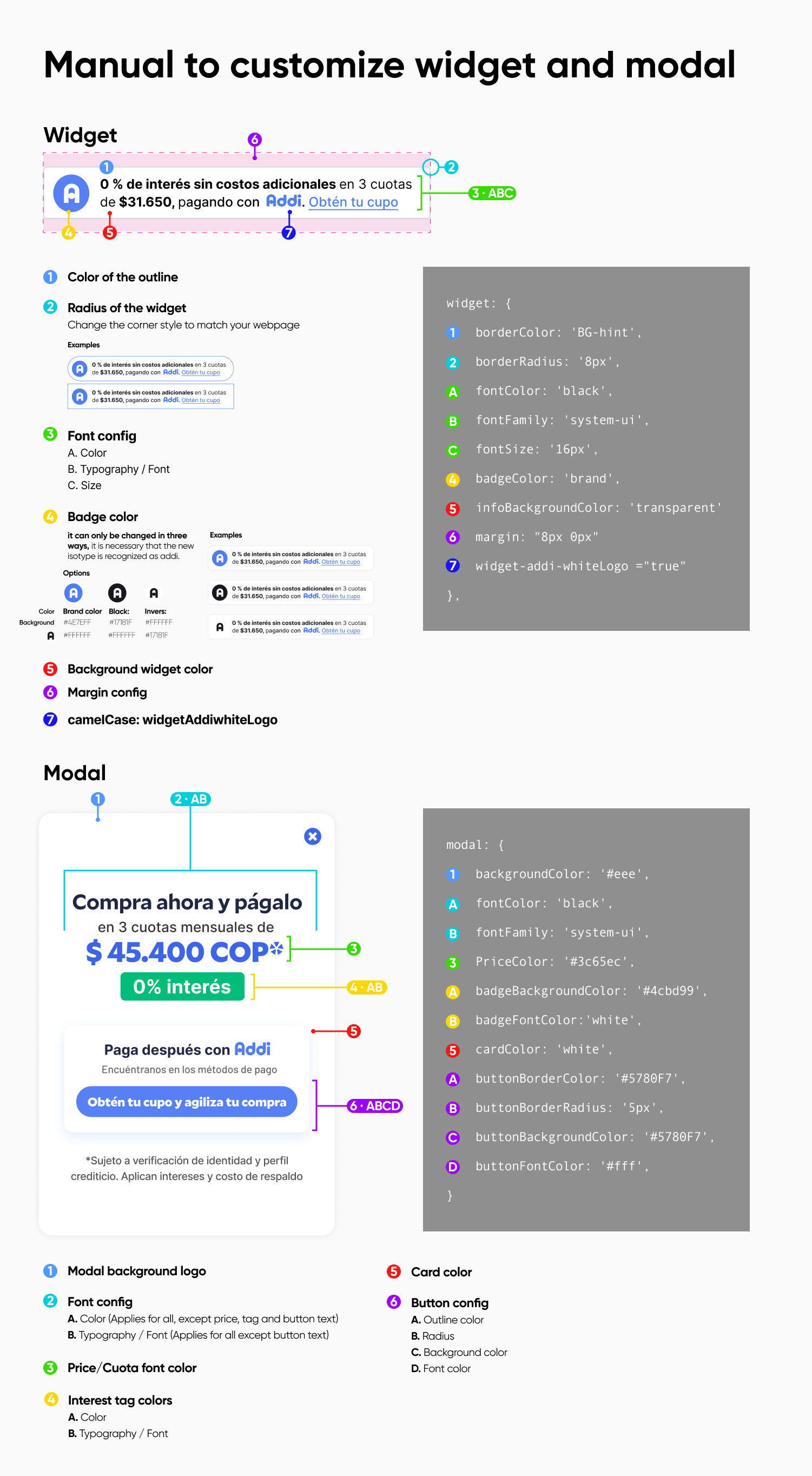
Si lo ves pertinente, puedes editar el look & feel del widget para que se ajuste mejor al de tu e-commerce. Para hacerlo, por favor configura los siguientes parámetros adicionales en el tag del widget:

```html
<addi-widget
        price="variable"
        ally-slug="ally-slug"
        custom-widget-styles='{
            "widget": {
                "borderColor": "blue",
                "borderRadius": "5px",
                "fontColor": "blue",
                "fontFamily": "system-ui",
                "fontSize": "14px",
                "badgeBackgroundColor": "white",
                "infoBackgroundColor": "transparent",
                "margin": "0",
                "whiteLogo": "true"
            },
            "modal": {
                "backgroundColor": "#eee",
                "fontColor": "blue",
                "fontFamily": "system-ui",
                "priceColor": "#3c65ec",
                "badgeBorderRadius": "5px",
                "badgeBackgroundColor": "#4cbd99",
                "badgeFontColor": "black",
                "cardColor": "white",
                "buttonBorderColor": "#4cbd99",
                "buttonBorderRadius": "5px",
                "buttonBackgroundColor": "transparent",
                "buttonFontColor": "#4cbd99"
            }
        }'></addi-widget>
```

Ejemplos de formato para la propiedad `fontFamily`:

```javascript
- 'Times New Roman', Times, serif;
- Arial, Helvetica, sans-serif;
- 'Roboto', sans-serif;
- 'Lucida Console', 'Courier New', monospace;
- Trebuchet MS, sans-serif
- Georgia, serif

Fuente: https://www.w3.org/Style/Examples/007/fonts.en.html
```
![](https://archbee-doc-uploads.s3.amazonaws.com/MCXyezaW9WrT4cGwqpD-5/OhIkUXefSQUM76EyAHKyi_wlyj6peqjxyvp-qotrenpdesign-details-5.png)

